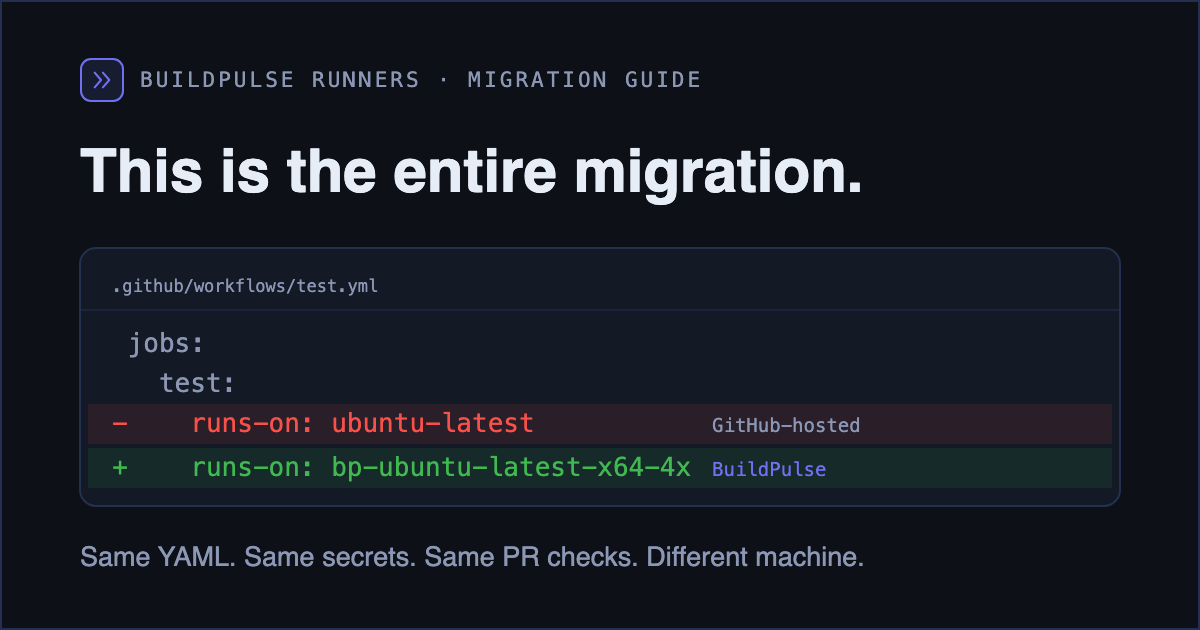
Migrating to BuildPulse runners is not a CI migration. Your workflows stay in GitHub Actions: same YAML, same secrets, same PR checks, same triggers. The only thing that changes is which machine picks up the job. That means most of what makes a CI migration scary (secrets import, dual-running pipelines, retraining the team) does not exist here.
We know exactly what this migration looks like because we just ran it on ourselves, thirteen times: every one of our public example repos, one per test framework, moved from GitHub-hosted to BuildPulse runners. The full ledger of what broke is its own post. Short version: for ten of thirteen repos the entire migration was one line.
The migration, start to finish
- Install the BuildPulse GitHub App and get your org provisioned
- Swap
runs-onin each workflow - Add setup actions for any tool your workflow assumed was preinstalled
- If you build Docker images: switch to the BuildPulse docker builder
- Optional but the point: add flaky-test detection to the same workflows
Step 1: Install the app, get provisioned
Install the GitHub App from buildpulse.io and
connect your organization. We provision runner capacity for your org, and the
bp-ubuntu-latest labels become available to your workflows.
One honest warning that applies to every runner vendor: a job targeting a label that is not provisioned for your org does not error. It queues, silently, forever. Before you merge anything, confirm your labels are live in your dashboard under Runners, in the Runner Sizes card:
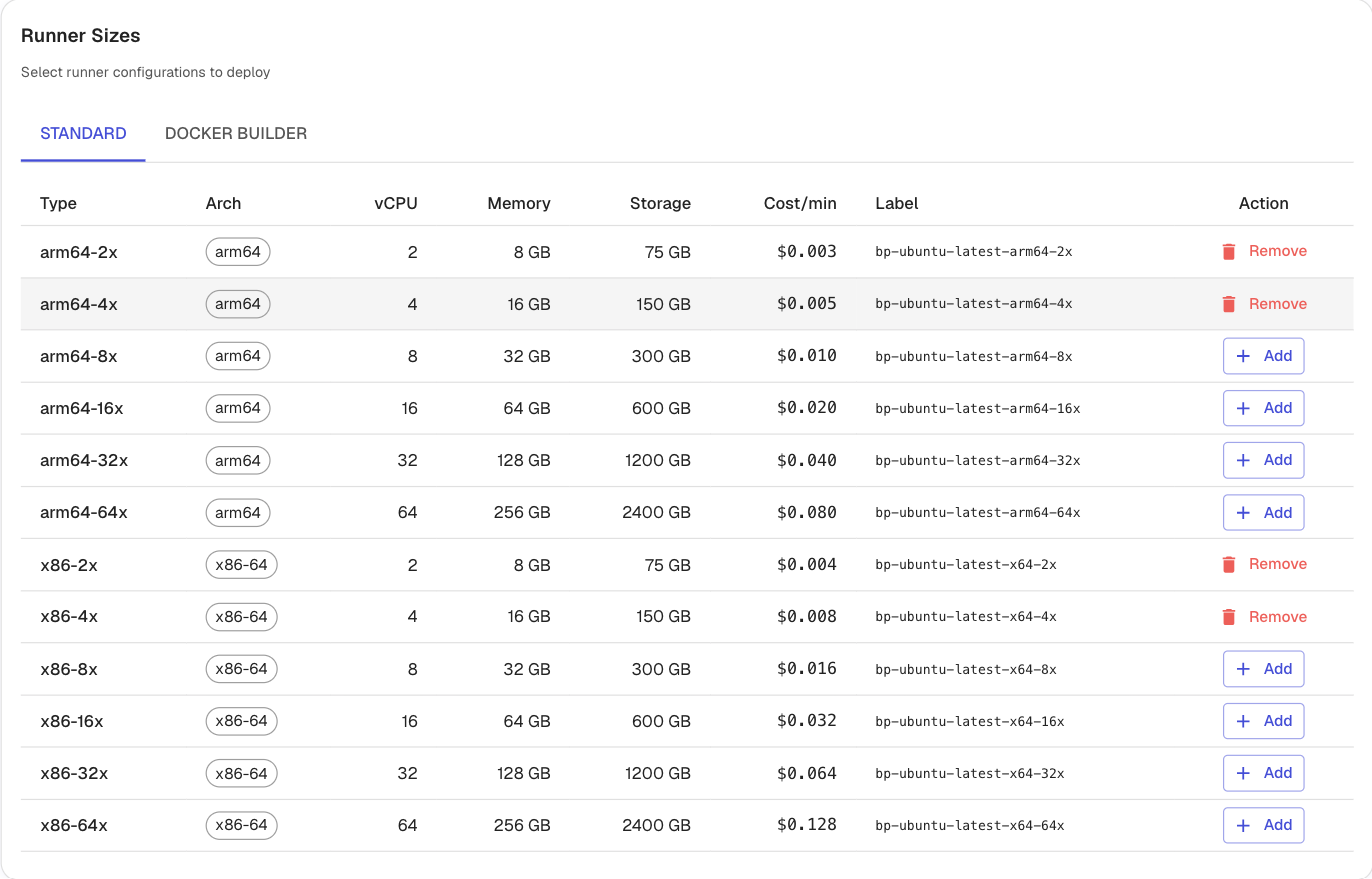
Or run one throwaway workflow on the new label and watch it get picked up.
Step 2: Swap runs-on
 jobs:
   test:
-    runs-on: ubuntu-latest
+    runs-on: bp-ubuntu-latest-x64-2x
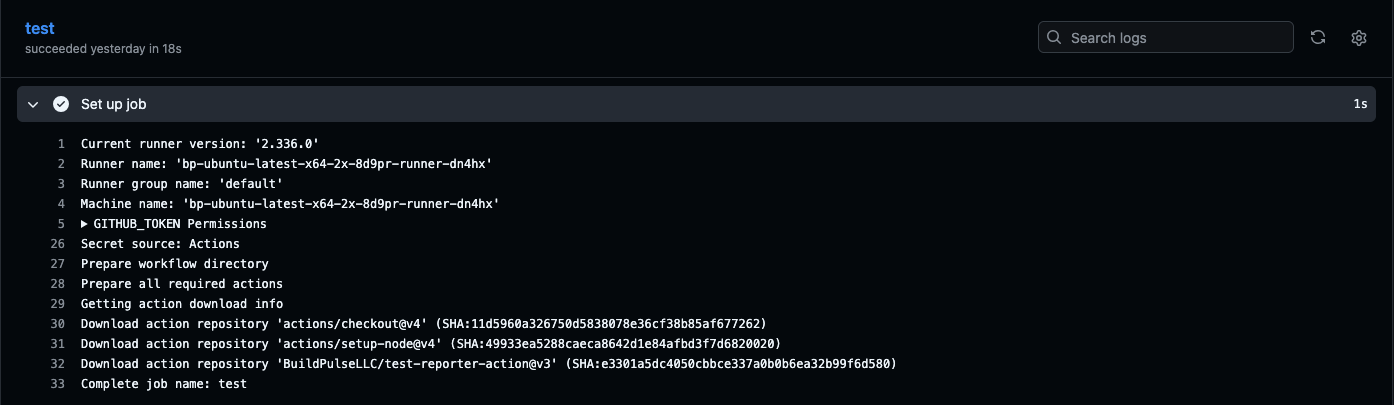
That one line is the whole swap. Here is what it looks like when it lands, with the runner name visible in the job's Set up job step:
Available sizes, each in x64 and arm64 (swap x64 for arm64 in the label):
| Label | vCPU / RAM |
|---|---|
| bp-ubuntu-latest-x64-2x | 2 vCPU / 8 GB |
| bp-ubuntu-latest-x64-4x | 4 vCPU / 16 GB |
| bp-ubuntu-latest-x64-8x | 8 vCPU / 32 GB |
| bp-ubuntu-latest-x64-16x | 16 vCPU / 64 GB |
| bp-ubuntu-latest-x64-32x | 32 vCPU / 128 GB |
| bp-ubuntu-latest-x64-64x | 64 vCPU / 256 GB |
Matrix jobs, reusable workflows, and composite actions need no changes: the label is the only contact point.
Step 3: Add setup actions for missing tools
GitHub-hosted images ship roughly 40 GB of preinstalled toolchain. Our image is deliberately minimal, which is a big part of why job pickup is fast. In practice the gap is smaller than it sounds. Across our thirteen-framework migration exactly three tools were missing, and each was one line with the setup action the ecosystem already uses:
+      - uses: sbt/setup-sbt@v1            # scala builds
+      - uses: shivammathur/setup-php@v2   # composer
+      - uses: browser-actions/setup-chrome@v1
If your workflow already uses setup actions to pin versions (setup-node, setup-python, setup-java), it will very likely run unchanged.
Step 4: Docker builds
If a workflow builds images with docker/setup-buildx-action, two things change: the
job targets a dedicated docker-builder pool, and the buildx action is swapped for ours.
In exchange you get a persistent per-tenant layer cache on local NVMe that survives
between runs, with no cache-from/cache-to configuration. It preserves layer cache
and RUN --mount=type=cache mounts, because the cache is the build daemon's own root:
jobs:
  build:
    runs-on: bp-docker-builder-x64-8x    # dedicated docker-builder pool
    steps:
      - uses: actions/checkout@v4
      - uses: buildpulse/setup-docker-builder@v1
      - uses: docker/build-push-action@v6
        with:
          push: true
          tags: myimage:latest
Docker-builder pools come in 4x, 8x, 16x, and 32x, in both architectures: bp-docker-builder-x64-<size> and bp-docker-builder-arm64-<size>. Start with 4x and size up if builds are CPU-bound.
What does NOT change
- Secrets: jobs run in GitHub Actions, so
${{ secrets.* }}resolve exactly as before. Nothing to import, nothing to rotate. - Caching:
actions/cacheworks as-is. (One caveat from our own migration: GitHub hard-disabledactions/cache@v2platform-wide in 2024. If a dusty workflow still pins v2 it is already broken on GitHub-hosted runners too; bump to v4.)
Step 5: The reason to bother
Faster and cheaper minutes are table stakes; every managed runner vendor sells those. The reason our runners exist is that they feed the same workflows into flaky-test detection, so a red build tells you whether the failure is your code or a known-flaky test before an engineer spends twenty minutes finding out manually:
      - name: Upload test results to BuildPulse
        if: always()
        uses: BuildPulseLLC/test-reporter-action@v3
        with:
          api-token: ${{ secrets.BUILDPULSE_API_TOKEN }}
          path: "**/reports/*.xml"
FAQ
How long does this actually take? Ten of our thirteen repos: the one-line label swap. The other three: one extra setup action each. The long tail is not the runner swap, it is discovering your CI was already quietly broken, which is worth knowing anyway.
What is job pickup time? Typically within 30 seconds. First job on a freshly provisioned org we measured at 16 seconds.
Do I have to move all repos at once? No. The label is per-job. Migrate one workflow, watch it, then roll out.
Runners that know whether the failure is your code or a flaky test. Try BuildPulse